
Learn about Wireless DMX!

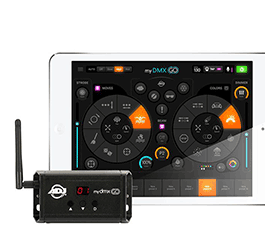
The evolution of lighting technology has transformed the way DJs create immersive and visually stunning experiences.
In the past, DMX lighting control required complex wiring setups with DMX cables. However, wireless DMX solutions have revolutionized the industry, offering greater flexibility and convenience. In this blog, we'll explore how to integrate wireless DMX, specifically the ADJ MyDMXGo, into your lighting setups. By eliminating the need for extensive cabling and utilizing features like WiFly technology, you can take your lighting control to new heights.
Understanding Wireless DMX:
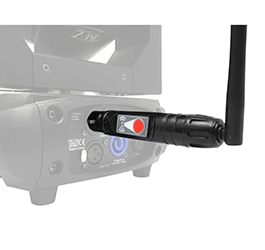
- Wireless DMX eliminates the need for physical DMX cables by transmitting DMX signals wirelessly. This technology allows for seamless control of lighting fixtures, including LED lighting and DJ lights, without the limitations of wired connections. Wireless DMX offers greater flexibility in positioning fixtures, simplifies setup and teardown, and opens up creative possibilities for your lighting design.
Introducing ADJ MyDMXGo:

-
ADJ MyDMXGo is a wireless DMX transmitter and receiver that enables you to control your lighting wirelessly. It utilizes WiFly technology, a reliable and widely used wireless communication protocol in the lighting industry. MyDMXGo provides a user-friendly interface, making it accessible to DJs of all levels of expertise.
Building Your Wireless DMX Setup:
- To get started, you'll need a combination of compatible lighting fixtures and the ADJ MyDMXGo. Consult with reputable DJ shops, such as AstroAVL, to find suitable wireless DMX-compatible fixtures for your lighting setup. Ensure that your fixtures have built-in WiFly receivers or can be connected to a wireless DMX receiver.
Connecting the ADJ MyDMXGo:
- Connect the ADJ MyDMXGo transmitter to your DMX controller or software using a DMX cable. The transmitter will send the DMX signals wirelessly to the MyDMXGo receivers connected to your lighting fixtures. Ensure that the MyDMXGo transmitter and receivers are within range of each other for optimal signal transmission.
Pairing the Transmitter and Receivers:
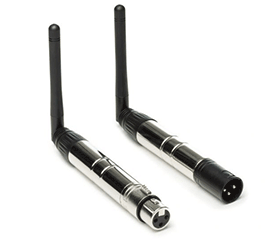
- The ADJ MyDMXGo system requires pairing the transmitter with the receivers. Follow the manufacturer's instructions to complete the pairing process, which typically involves pressing specific buttons or using software settings. This step establishes a secure wireless connection between the transmitter and receivers.
Setting DMX Channels and Addresses:
- Assign DMX channels and addresses to your lighting fixtures to control them individually or in groups. Use the DMX controller or software connected to the ADJ MyDMXGo transmitter to configure the desired settings. This step allows you to adjust parameters such as color, intensity, movement, and effects wirelessly, providing maximum flexibility in your lighting design.
Fine-tuning and Programming Lighting Effects:
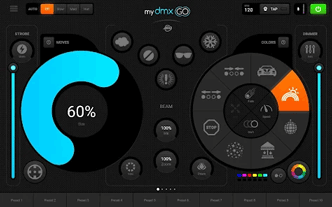
- Once your wireless DMX setup is complete, it's time to fine-tune and program your lighting effects. Use the controls on your DMX controller or software to adjust the parameters of each fixture. Experiment with different lighting sequences, colors, and movements to create captivating and synchronized visuals that complement your music and performances.
Conclusion:
Wireless DMX solutions like ADJ MyDMXGo offer DJs the freedom and flexibility to control their lighting setups wirelessly. By eliminating the need for extensive cabling and incorporating features like WiFly technology, DJs can simplify setup and teardown processes while creating visually stunning lighting designs. With wireless DMX, compatible lighting fixtures, and a reliable transmitter like the ADJ MyDMXGo, you can take full control of your lighting effects and elevate your performances to new heights. Embrace the future of lighting control and unlock your creative potential with wireless DMX.
Check out all the available Wireless DMX gear at Astro!

June 23, 2023
|
View: 2884
|
Categories: DJ Tips
|
Tags: DJ Tips and Tricks, Social Media, Beginner DJ, DJ Gig, Music Production, DJ Gear, LED Lighting, Lighting Controller, ADJ
|
By: Santana
About the Author





Communication is Key!
September 5, 2023
Mastering the Club DJ Setup
July 27, 2023
Cable Management for DJs
September 5, 2023
You Gotta Adapt!
September 5, 2023
Mastering the Basics
July 11, 2023
Communication is Key!
September 5, 2023
You Gotta Adapt!
September 5, 2023
Cable Management for DJs
September 5, 2023
Mastering the Club DJ Setup
July 27, 2023
Break it Down with Serato Stems!
July 27, 2023
Comments