
Break it Down with Serato Stems!

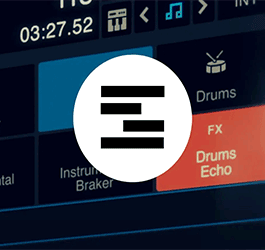
Serato DJ Pro 3.0 brings an exciting new feature to the DJ world—Serato Stems. This innovative technology allows DJs to access individual components of a track, such as drums, bassline, vocals, and melody, empowering them to create unique and dynamic mixes.
In this article, we will explore how to harness the power of Serato Stems in Serato DJ Pro 3.0 while using controllers like the DDJ-FLX10 and Rane Four, enabling you to push the boundaries of creativity in your DJ sets.
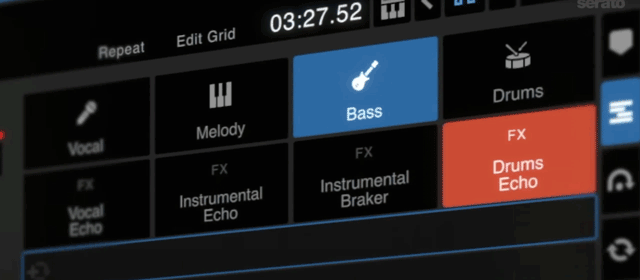
Understanding Serato Stems:
- Serato Stems is a format that provides DJs with the ability to isolate and manipulate individual elements of a track in real-time. It breaks down a song into four separate parts: drums, bass, vocals, and melody. Each stem is assigned to a specific channel in the DJ software, allowing you to manipulate and mix them independently for creative possibilities.
Compatible Controllers and DJ Software:
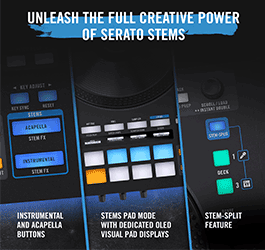
Rane Four Stems Controls
- To fully leverage the power of Serato Stems, ensure that you have a compatible controller. The DDJ-FLX10 and Rane Four are popular options that work seamlessly with Serato DJ Pro 3.0. These controllers offer intuitive controls, extensive connectivity, and dedicated stem control features that enhance your performance capabilities.
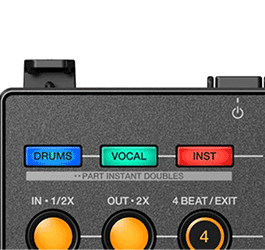

DDJ-FLX10 Stems Controls
Exploring Stem Mixing:
- Serato Stems opens up a world of possibilities for DJs, allowing you to mix tracks in new and unique ways. Experiment with isolating and emphasizing specific elements of a song by adjusting the volume or applying effects to individual stems. Create exciting build-ups and breakdowns by gradually bringing in different stems, adding a new level of tension and release to your mixes.
Layering Stems for Mashups and Remixes:
- One of the most exciting aspects of Serato Stems is the ability to blend stems from different tracks. By layering stems, you can create mashups and remixes on the fly, seamlessly combining elements from multiple songs. Use the vocals from one track with the bassline from another, or experiment with different drum patterns to create unique sonic textures.
Applying Effects to Individual Stems:
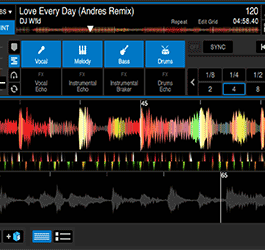
- Another creative application of Serato Stems is applying effects to specific elements of a track. By isolating the stem you want to process, you can experiment with effects such as reverb, delay, or distortion, giving each stem its own sonic character. This technique can add depth, texture, and excitement to your mixes, elevating your performance to new heights.
Exploring Stem Looping and Sampling:
- Serato Stems also provides opportunities for innovative loop-based performances. Loop a specific stem, such as a catchy vocal hook or a distinctive melody, and layer it with other stems or additional tracks. Use the looped stems as samples, triggering them at strategic moments to create rhythmic patterns or build tension during your DJ sets.
Research and Learn from Online Resources:
- To fully grasp the potential of Serato Stems, explore online tutorials, forums, and resources dedicated to this feature. Many DJs share their techniques, tips, and tricks, offering valuable insights on how to maximize the creative potential of Serato Stems in your performances.
Serato Stems in Serato DJ Pro 3.0 unlocks a new dimension of creativity for DJs, allowing you to manipulate and mix individual elements of tracks in real-time. By using controllers like the DDJ-FLX10 or Rane Four, you can explore unique ways to layer, remix, and manipulate stems, enhancing your performances and captivating audiences. Utilize online resources, experiment, and visit your local DJ shop to fully unleash the potential of Serato Stems and take your DJ sets to the next level.
Check out the rest of the Astro Website to get set up with Serato Stems!

July 27, 2023
|
View: 9868
|
Categories: DJ Tips
|
Tags: DJ Tips and Tricks, Beginner DJ, DJ Gig, DJ Gear
|
By: Santana
About the Author







Communication is Key!
September 5, 2023

Mastering the Club DJ Setup
July 27, 2023
Cable Management for DJs
September 5, 2023

You Gotta Adapt!
September 5, 2023

Mastering the Basics
July 11, 2023
Communication is Key!
September 5, 2023
You Gotta Adapt!
September 5, 2023
Cable Management for DJs
September 5, 2023
Mastering the Club DJ Setup
July 27, 2023
Break it Down with Serato Stems!
July 27, 2023
Comments