
Get Smart with Smart Crates!


In the world of DJing, staying organized is crucial for seamless performances and efficient music selection. With the advent of digital DJ programs like Serato DJ Pro, managing your vast music library has become easier than ever before.
Serato DJ Pro offers a powerful feature called Smart Crates that empowers DJs to intelligently organize their music collection. In this blog, we will explore how to leverage Smart Crates to organize your Serato DJ library effectively.
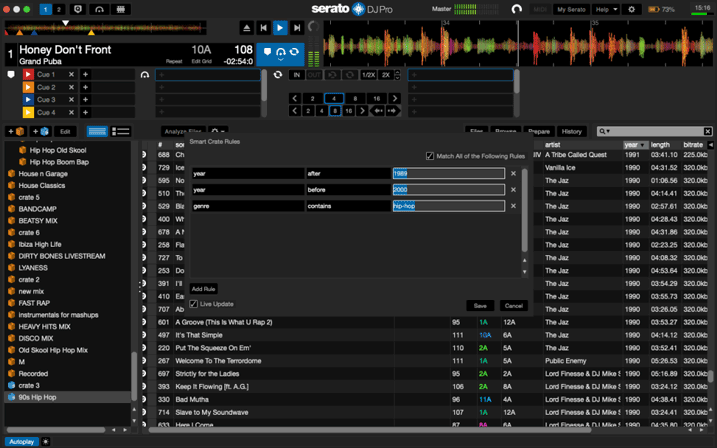
 Don't have the time to manually organize you're library like this?
USE SMART CRATES!
Understanding Serato DJ Pro and Smart Crates:
- Serato DJ Pro is a leading DJ software that has revolutionized the industry. It allows DJs to mix and manipulate music seamlessly using turntables, controllers, or other compatible devices. One of its standout features is Smart Crates, which provides automated playlist generation based on specified criteria.
Setting Up Your Smart Crates:
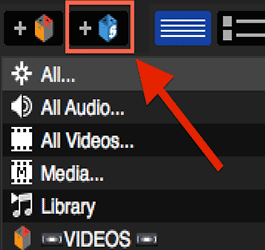
- To begin organizing your library, launch Serato DJ Pro and navigate to the Library panel. Right-click on "Crates" and select "Create Smart Crate." You can now define rules and criteria that will automatically sort and populate your Smart Crates.
Sorting by Genre, BPM, and Key:
- Smart Crates allow you to sort your music collection by various criteria. Sorting by genre is a great way to quickly access specific styles of music. Similarly, arranging tracks by their BPM (beats per minute) helps in building smooth transitions during mixes. Another useful option is sorting by key, enabling harmonic mixing and creating harmonic progressions within your sets.
Utilizing Metadata for Organization:
- Serato DJ Pro retrieves extensive metadata from your music files, including track names, artist names, album titles, and more. You can leverage this information to create Smart Crates based on specific artists, albums, or release years. Utilizing the metadata ensures your Smart Crates stay up-to-date as your library grows.
Rating and Play Count:
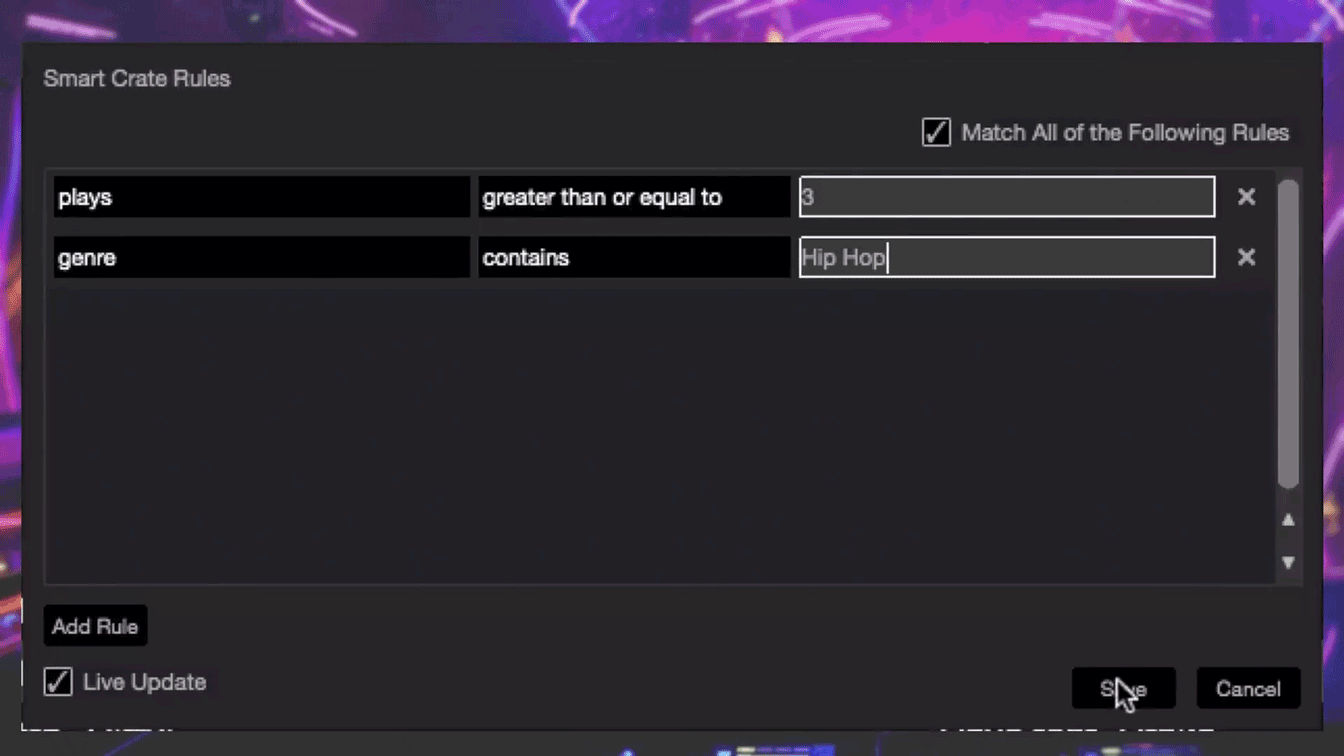
- Smart Crates can be created based on the rating or play count of your tracks. By assigning ratings to your music, you can quickly generate playlists of your favorite tunes or prioritize frequently played tracks. This feature is particularly useful for creating sets that resonate well with your audience.
Customizing Smart Crate Rules: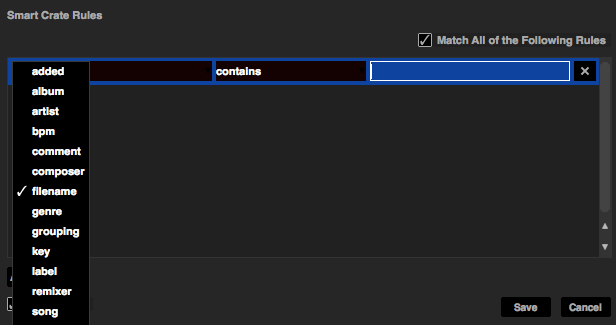
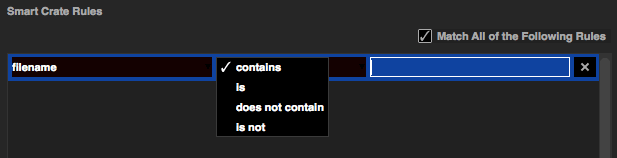
- Serato DJ Pro allows you to fine-tune the rules for your Smart Crates. You can combine multiple criteria using logical operators like "and" or "or" to create complex rules. This flexibility enables you to craft highly personalized playlists that perfectly match your unique style as a DJ.
Regular Maintenance and Updates:
- Organizing your DJ library using Smart Crates is an ongoing process. As you add new tracks or update metadata, ensure that your Smart Crates are updated accordingly. Regular maintenance guarantees that your library remains organized and allows for effortless music selection during performances.
Conclusion:
In the fast-paced world of DJing, having a well-organized music library is essential for creating captivating sets and delivering memorable performances. Serato DJ Pro, combined with the power of Smart Crates, empowers DJs to effortlessly manage their music collection. By utilizing Smart Crates, DJs can sort their tracks by genre, BPM, key, and other criteria, creating a seamless workflow and saving precious time. So, head over to AstroAVL or your favorite DJ store, grab a copy of Serato DJ Pro, and take advantage of Smart Crates to elevate your DJing experience to new heights!
Check out all the available gear that works with Serato DJ Pro on the Astro Website!

May 19, 2023
|
View: 1353
|
Categories: DJ Tips
|
Tags: DJ Tips and Tricks, TikTok, Beginner DJ, DJ Gig, DJ Gear
|
By: Santana
About the Author







Communication is Key!
September 5, 2023

Mastering the Club DJ Setup
July 27, 2023
Cable Management for DJs
September 5, 2023

You Gotta Adapt!
September 5, 2023

Mastering the Basics
July 11, 2023
Communication is Key!
September 5, 2023
You Gotta Adapt!
September 5, 2023
Cable Management for DJs
September 5, 2023
Mastering the Club DJ Setup
July 27, 2023
Break it Down with Serato Stems!
July 27, 2023
Comments